
GenUI: Beyond the Chatbot
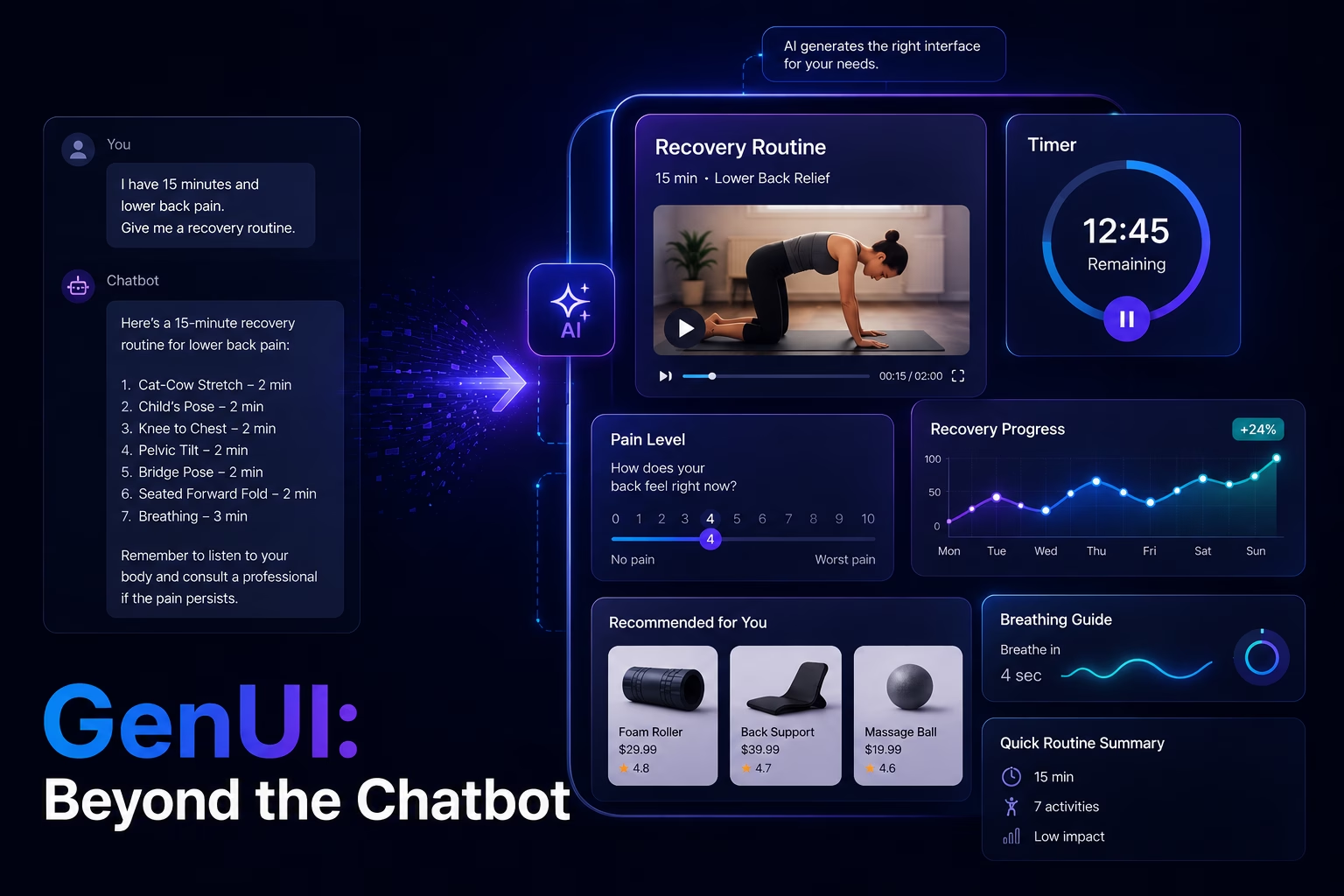
For years, “AI” in applications meant one thing: a chatbot. You type a prompt, and the computer types back. While useful for answering questions, text is a poor interface for complex tasks like booking a flight, shopping, or following a fitness routine.
The next step for AI-powered applications goes beyond better text responses toward interfaces that adapt to user context and intent. GenUI is a Flutter package that takes a step in this direction, enabling AI to generate interactive UI structures rather than static text alone.
Beyond Text: A New Interaction Model
Traditional chatbots force users to do much of the mental work themselves. Ask for a travel itinerary and you receive a list. Ask for a product recommendation and you get a link. The information may be correct, but the format isn’t optimized for action.
GenUI introduces a different interaction model. Instead of responding with paragraphs of text, an AI agent can respond with UI widgets: structured, visual, and immediately usable.
All reasoning and decision-making still comes from the AI agent (LLM). The difference is how that output is delivered. GenUI translates the AI’s intent into interactive visual components, creating experiences that are more actionable and easier to follow.
A New Way to Build and Interact
In traditional app development, developers hard-code every screen: a specific list of exercises, a fixed timer, and a static progress bar. The structure is decided upfront, long before the user’s real needs are known.
GenUI flips this dynamic by changing the developer’s role. Instead of building static screens, the developer defines a “Widget Catalog”, a curated set of UI components the AI is allowed to use. This catalog can include standard elements as well as highly customized widgets, such as a branded checkout flow, a specialized video player, or a complex data visualization.
Once this catalog is established, the interaction model transforms. When a user asks a question, the AI Agent answers with interactive widgets, not just plain text.
Consider this example:
- User’s Request: “I have 15 minutes and lower back pain. Give me a recovery routine.”
- AI logic: The LLM analyzes the request and evaluates which widgets from the catalog best fit the situation.
- GenUI response: Instead of a descriptive paragraph, the AI assembles a short routine using a video player for stretches, a countdown timer, and an interactive pain-level slider.
Because these are real widgets, they are fully interactive. The user can start the timer or adjust the slider, and the AI can read that data to further adapt the session in real-time.
How It Works
From a technical perspective, GenUI acts as an orchestration layer between the user, the Flutter app, and the AI agent.
- GenUiConversation manages the overall flow, sending user input to the AI and handling responses.
- The Catalog defines which widgets the AI is allowed to use. The AI can’t invent new components, but it can compose existing ones in countless ways.
- DataModel serves as the centralized UI state. Widgets bind to this model, so when the AI updates the data, the UI updates automatically.
- A2uiMessage is the communication format the AI uses to instruct the app to update data or surface new UI elements.
This separation keeps the system flexible while maintaining full control over what the AI can render.
Why This Matters for Business
For companies, this technology bridges the gap between static apps and human-like assistance.Instead of delivering explanations, applications can deliver experiences.
A shopping assistant can generate a comparison table rather than listing products. A financial assistant can render an interactive spending chart instead of describing a budget in words. Each interaction feels more tailored, without requiring teams to pre-build every possible screen.
By separating UI logic (AI-driven decisions) from UI rendering, teams can build applications that respond more naturally to user needs and evolve without constant redesigns.
Conclusion
The era of the static, one-size-fits-all interface is starting to fade. With GenUI, we are moving toward a world where the UI is no longer a fixed container, but a fluid response to human intent.
Whether in coaching, travel, or commerce, this shift ensures that AI doesn’t just provide answers, it builds the exact tools needed to act on them. The future of apps isn’t about replacing screens with text, but about making interfaces flexible enough to meet users where they are.
