
Creating a Shopify App: Node.js & React in Action
Shopify stands as a global leader in e-commerce, but its true strength lies not just in its foundational platform but significantly in its powerful and vast app ecosystem. This ecosystem is the engine of its adaptability, transforming a robust platform into a highly customizable business solution for merchants of all sizes, from a small startup to a multinational enterprise.
The platform itself provides all the essentials for an online store: product listings, a shopping cart, and payment processing. However, modern e-commerce demands much more. This is where the app ecosystem shines. It allows developers to extend core platform functionality, filling highly specialized gaps and catering to unique business needs.
In the past few months, I’ve been focused on developing a Shopify application designed to enhance e-commerce operations by providing custom shipping rates and improved checkout process features.
My goal was to create an app that integrates deeply and securely with Shopify stores, providing smooth interactions for both merchants and customers.
Technical Architecture: One Backend, Two Frontends
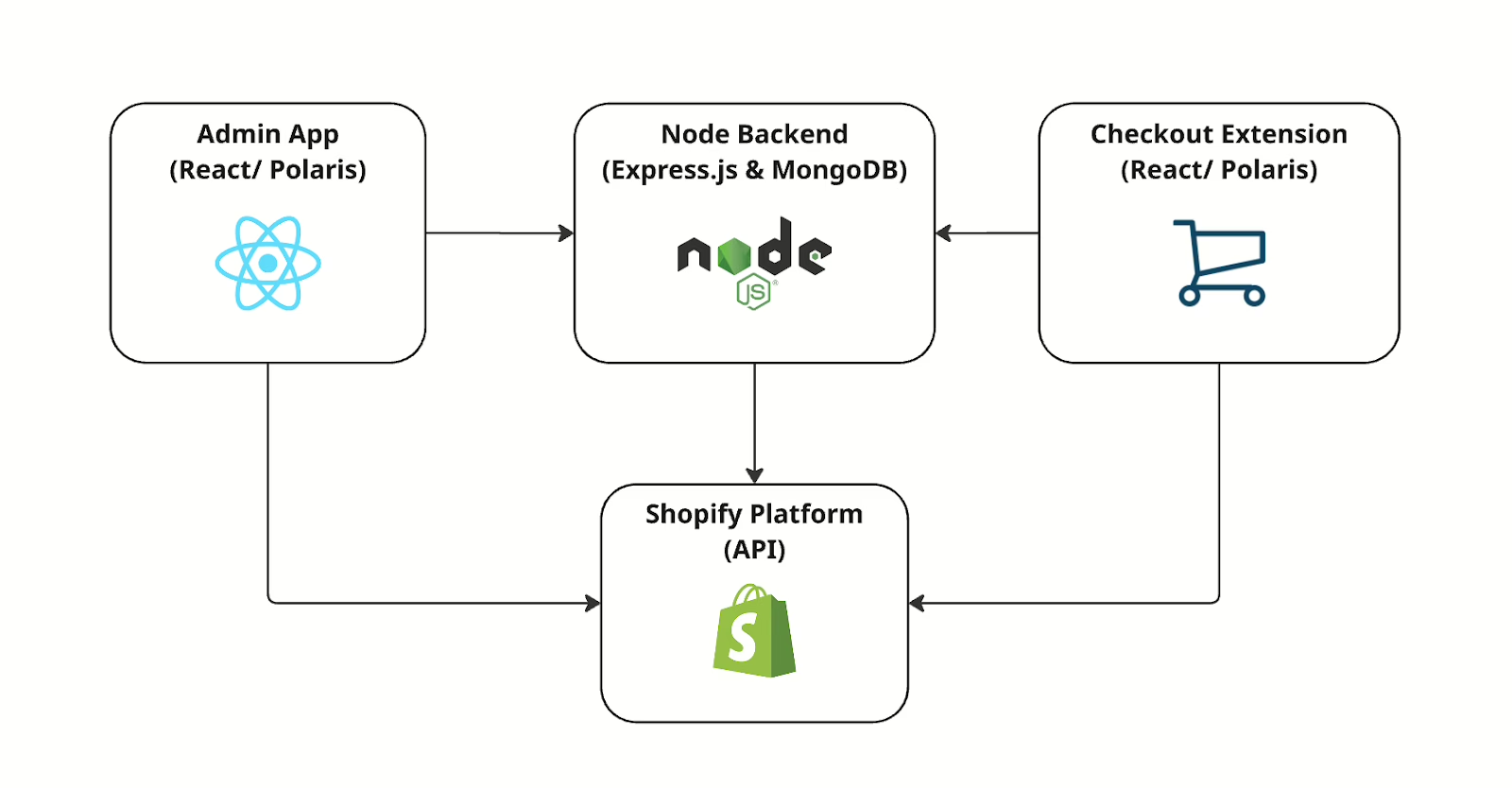
From a technical perspective, the app required a dual-interface approach: one for the store administrator and one for the customer checkout experience, all served by a single, centralized backend.
- The Backend: Built on Node.js and Express.js, the backend manages all critical operations: API requests, secure authentication via Shopify’s OAuth system, data processing, and state synchronization. Crucially, the backend utilizes the Carrier Service API to dynamically calculate and return customized shipping rates to Shopify during the checkout process, allowing us to implement our own complex logistics logic. Persistence is handled via a MongoDB database.
- The Admin Frontend: The store management interface is a dynamic and responsive Single Page Application (SPA) built using React and styled with Shopify Polaris to provide a native admin experience. This is where store owners configure settings, shipping information, etc.
- The Customer Frontend: This is deployed as a Shopify Checkout UI Extension. It leverages the custom rates provided via the Carrier Service API and communicates with the same Node.js backend to fetch real-time order data, ensuring a seamless and interactive experience for customers during the purchase process.
This single-backend architecture was crucial for maintainability and data consistency, ensuring that any updates, whether from the admin interface or external API calls, are instantly reflected across both the merchant-facing and customer-facing components.
Security and Data Handling
Security was the non-negotiable top priority, especially when handling sensitive e-commerce data. All data exchanged between the interfaces, the backend, and Shopify’s APIs is encrypted. Furthermore, all access is strictly governed by Shopify’s OAuth authorization flow, which requires careful handling of tokens and redirects to ensure that each store’s data remains private and secure against unauthorized access.
Key Challenges and Learnings
Building for a platform like Shopify presents specific challenges that provide invaluable learning experiences:
- API Rate Limits: Shopify imposes strict limits on the number of API calls an app can make. This necessitated designing efficient data fetching strategies and implementing a robust caching layer to avoid throttling and maintain fast performance.
- OAuth Complexity: Mastering Shopify’s OAuth flow—from initial install to token renewal—required meticulous attention to detail to ensure continuous service authorization.
- Frontend-Backend Coordination: While the shared backend simplified data consistency, coordinating the deployment and state management across the decoupled React Admin SPA and the Shopify-hosted Checkout Extension was a continuous effort.
Deployment and Shopify Plus Limitation
The application is fully deployed to the Shopify App Store and integrates directly with merchant stores. One key feature is that it modifies the checkout UI, providing a dynamic, interactive experience for customers during purchase. Due to Shopify’s restrictions on checkout customization, this feature is available only for Shopify Plus stores, which grant the necessary access to Checkout UI Extensions.
This limitation shaped some architectural decisions, ensuring that the app could safely and efficiently serve only eligible stores while maintaining compatibility with Shopify’s APIs and security standards.
Getting Started with Shopify App Development
If you’re interested in building your own Shopify app, here’s a quick guide to get started:
- Set Up a Shopify Partner Account
- Go to the Shopify Partners site and sign up.
- This account lets you create test stores, develop apps, and eventually publish them on the Shopify App Store.
- Create a Test Store
- In your Partner Dashboard, create a new development store.
- When setting up the store, you can select “Shopify Plus” if you want to test checkout customizations. This is necessary for apps that include Checkout UI Extensions, which only run on Plus stores.
- Test stores mimic real Shopify stores, letting you experiment with products, orders, and apps safely without affecting a live business.
- Install Shopify CLI
- Shopify CLI helps scaffold apps, run them locally, and deploy them.
- It supports Node.js, Ruby, and other frameworks, making app development smoother.
- Start Your First App
- Use Shopify CLI to generate an app template:
shopify app create node - This sets up a Node.js backend with basic OAuth flow and Polaris-ready frontend.
- Use Shopify CLI to generate an app template:
- Connect Your App to the Test Store
- During development, install your app on the test store.
- This allows you to test features like admin dashboards, webhooks, and checkout customizations in a safe environment.
- Test Checkout UI Extensions (Shopify Plus Only)
- If you plan to customize the checkout experience, make sure your test store is a Shopify Plus store, since Checkout UI Extensions require Plus access.
- Use the CLI to run your extension locally and see changes live in the checkout flow.
- Iterate and Deploy
- Build features incrementally. Test frequently on your development store before considering publishing.
- Once ready, submit the app through your Partner Dashboard for review and distribution.
Final Thoughts
Developing this application was a highly rewarding experience that combined modern web technologies (Node.js, React) with the demands of a major e-commerce platform. It provided hands-on, end-to-end experience in architecting a secure, maintainable, and scalable solution that integrates directly into the core e-commerce workflow. For developers embarking on their own platform app journey, I recommend starting with a sharp focus on core functionality, security, and a robust data strategy from day one.
